 SSH Command
01
FTP and FTPS
Explicit TLS and implicit TLS, with a clear “encrypted” badge. Untrusted or self-signed certificates are refused unless you accept them for that connection.
SSH Command brings FTP, FTPS, SFTP, SCP and a live SSH shell under one roof, with an encrypted vault and a prompt before any file is overwritten. One app for Mac, Windows and Linux.
Free for personal use · Mac (Apple Silicon), Windows and Linux · Commercial licence $39 once, see pricing
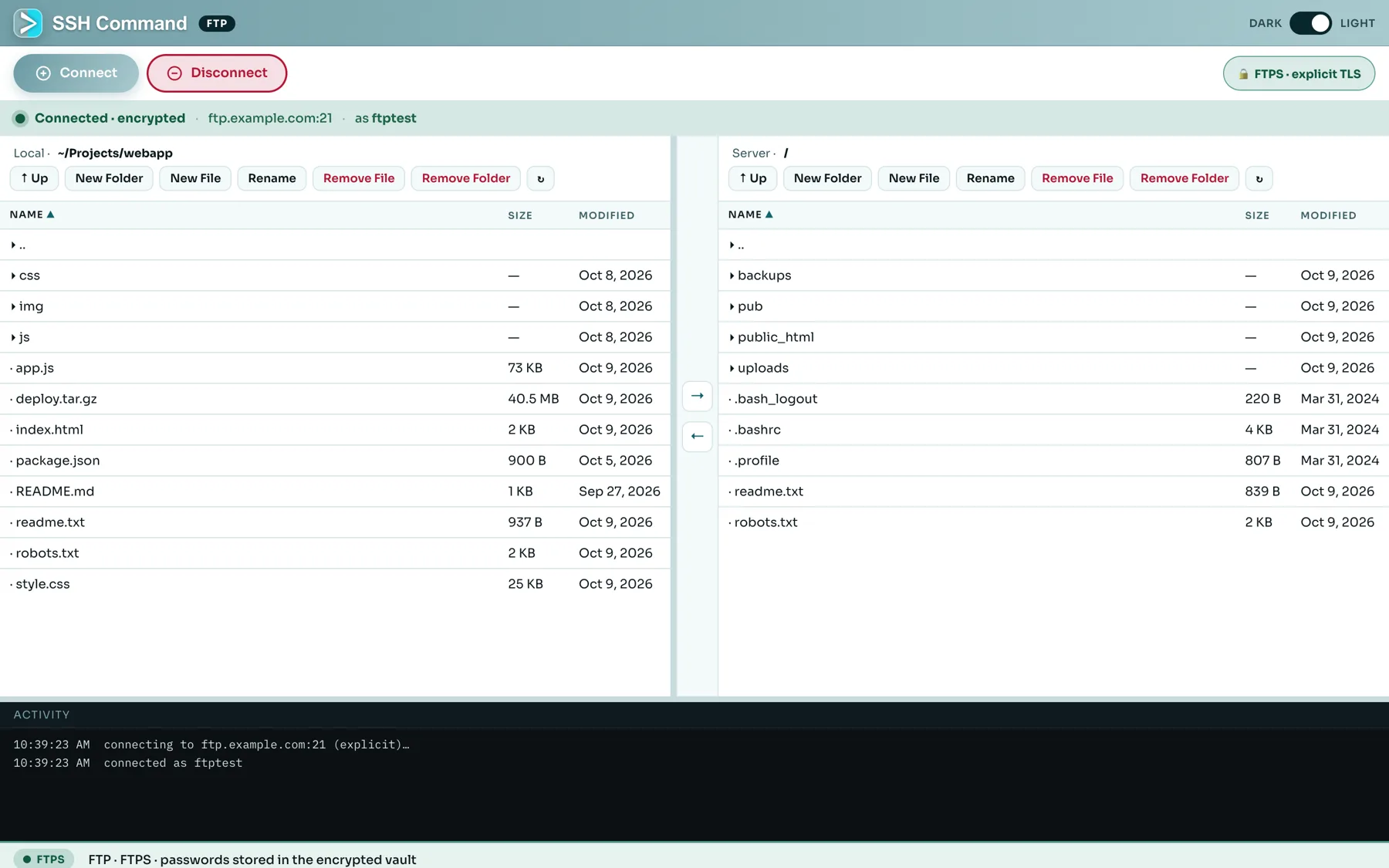
SSH Command is where SSH, SFTP, SCP and FTP stay together under one roof, so you stop switching between FileZilla, WinSCP and a terminal.
Explicit TLS and implicit TLS, with a clear “encrypted” badge. Untrusted or self-signed certificates are refused unless you accept them for that connection.
Local on the left, server on the right. New folder, new file, rename, remove, recursive remove, and one-click upload and download between the panes.
Save logins under a master password. AES-256-GCM with scrypt key derivation, stored only on your computer, locked automatically when you are away.
If a file already exists you see both versions’ size and date and choose what to replace — or opt out for the session.
Native builds for Apple Silicon, Windows (installer or portable) and Linux (AppImage and .deb, x64 and ARM64).
Same app, same servers: open an interactive terminal, copy with SCP, forward ports, hop through a bastion — without a second program.
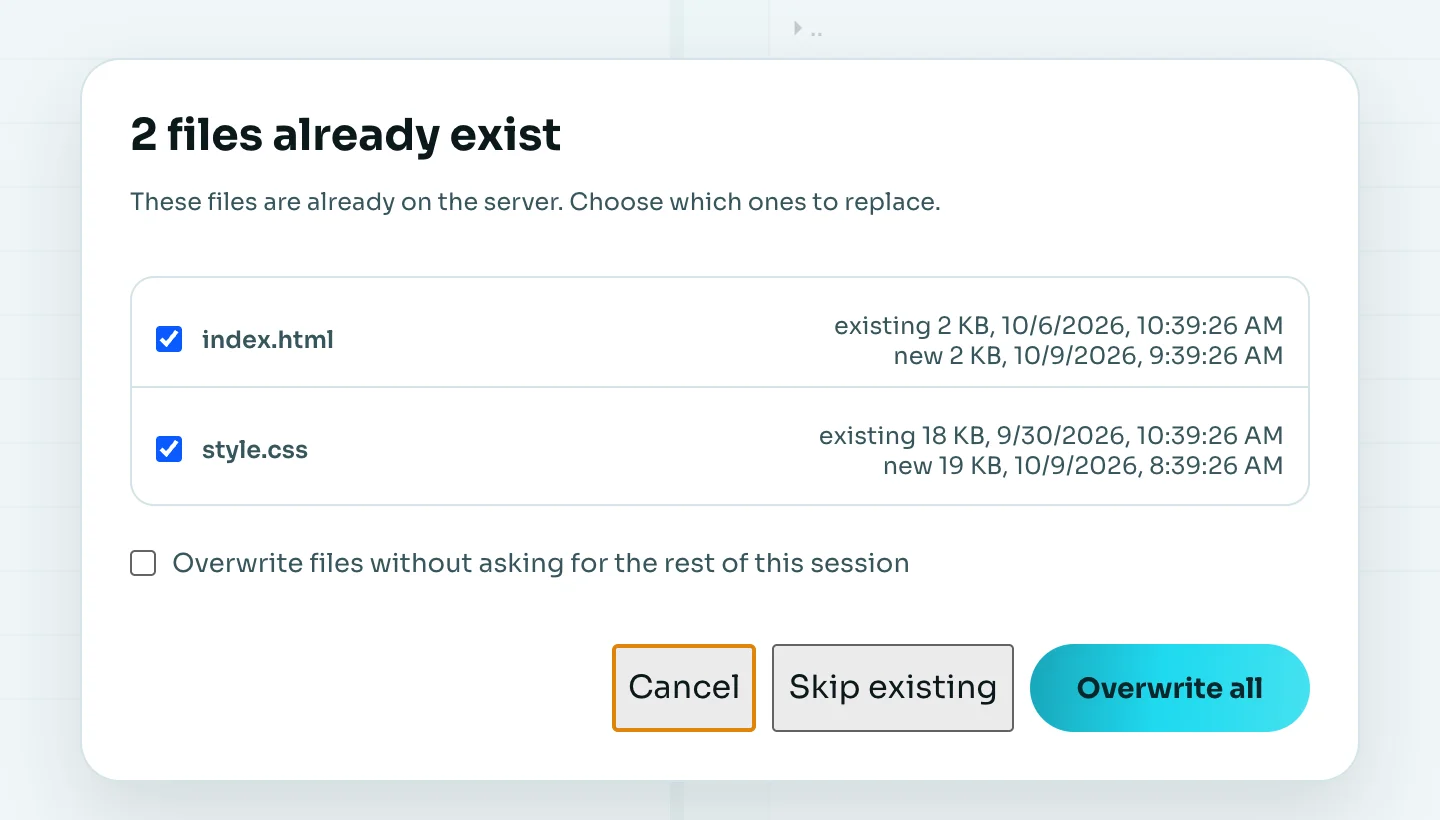
It is easy to replace a newer file with an older one by accident. SSH Command checks the destination first — for FTP, FTPS, SFTP and SCP — and lists every clash. Tick the ones to replace, skip the rest, or cancel.
FileZilla is a respected, free, open-source FTP client. Here is how the two compare, including where FileZilla is the better fit.
| Capability | SSH Command | FileZilla Client |
|---|---|---|
| FTP | Yes | Yes |
| FTPS (explicit & implicit TLS) | Yes | Yes |
| SFTP (SSH file transfer) | Yes | Yes |
| SCP | Yes | No |
| Built-in SSH terminal on the same connection | Yes — xterm shell, same login | No |
| Dual-pane local ↔ server view | Yes | Yes |
| Passwords stored encrypted | Master-password vault (AES-256-GCM) | Site Manager; protection options vary by version |
| Asks before overwriting an existing file | Yes, with sizes and dates; session opt-out | Yes (file exists actions) |
| Run commands as root without logging in as root | Explicit, time-limited sudo | No |
| Jump hosts & port forwarding | Yes (free) | No built-in SSH tunnels |
| Reconnect automatically after a drop | Yes, with backoff | Configurable retries |
| Folder sync with a preview | Pro | Directory comparison & synchronized browsing |
| Transfer queue with parallel transfers & resume | Not yet | Yes — a core strength |
| Mac, Windows and Linux | Yes | Yes |
| Source code | Closed (free for personal use) | Open source |
| Price | Free personal · $39 once for work | Free · paid Pro edition for extra protocols |
FileZilla, WinSCP and PuTTY are trademarks of their respective owners; SSH Command is not affiliated with them. The comparison reflects the publicly documented features of their current desktop clients at the time of writing and is meant to be fair, so it also lists where they are stronger. Spotted something out of date? Tell us.
People search for “FTP client” when they often need SFTP. SSH Command speaks all of them, so you can pick the safest one your server offers.
| Protocol | Port | Encrypted? | Typical use | In SSH Command |
|---|---|---|---|---|
| FTP | 21 | No — password and files travel in clear text | Public downloads, trusted internal networks | Yes |
| FTPS — explicit | 21 (AUTH TLS) | Yes — TLS after connecting | Hosting panels that offer “FTP over TLS” | Yes |
| FTPS — implicit | 990 | Yes — TLS from the first byte | Older servers that insist on implicit TLS | Yes |
| SFTP | 22 (SSH) | Yes — everything inside SSH | Linux servers, cloud VMs, anything with SSH | Yes |
| SCP | 22 (SSH) | Yes — inside SSH | Quick one-off copies from a script or terminal | Yes |
Not sure? If your server has SSH, use SFTP. If it is a web host that only offers FTP, choose explicit FTPS.
Pick the Mac, Windows or Linux build from the download section. It is free for personal use.
Open the FTP window, enter host, port, username and password, choose Explicit FTPS (or plain FTP / implicit FTPS), and connect.
Accept “Save this host?” once. Your login is stored encrypted under your master password and ready next time.
There is no one-click import of FileZilla’s Site Manager yet, so you re-enter each site once.
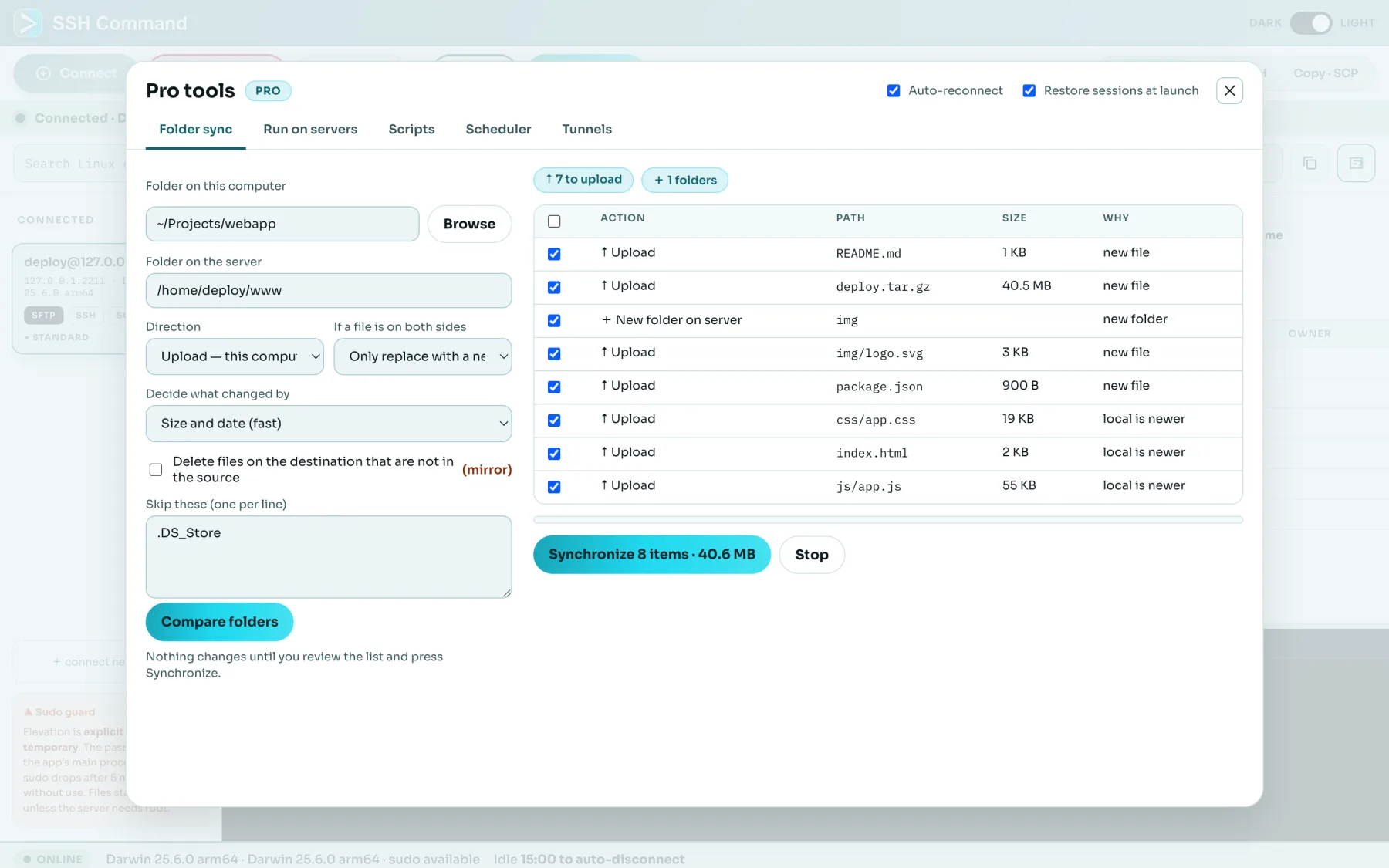
For whole folders, SSH Command’s Pro tools compare a local and a remote folder, show every change before anything happens, and mirror deletes only after you confirm. They run over SSH/SFTP connections.
If you mostly move files over FTP, FTPS or SFTP and you also open a terminal on the same servers, yes: SSH Command puts the file panes, an SSH shell, SCP and an encrypted password vault in one app on Mac, Windows and Linux. If you rely on FileZilla's transfer queue with resume, directory comparison or its Site Manager imports, keep that in mind: those are areas where FileZilla is stronger today (see the table above).
Yes. Explicit FTPS (AUTH TLS on port 21) and implicit FTPS (port 990) are supported. A server with an untrusted or self-signed certificate is refused by default; you can choose to accept it for that connection. The window shows an encrypted badge so you can see at a glance whether a session is protected.
Plain FTP sends your password and files unencrypted, so use it only on a trusted network or for public downloads. SSH Command labels unencrypted sessions clearly, so you always know what protection a connection has. Prefer FTPS or SFTP whenever your server offers them.
It is free for personal use: hobby projects, learning, home labs and servers you administer for yourself. Using it for work needs a commercial licence, $39 per user, paid once, with 12 months of updates and use on up to four of your own devices. FTP, FTPS, SFTP, SCP, the SSH shell, the vault, jump hosts, port forwarding and auto-reconnect are all free; only the Pro tools (folder sync, scheduled transfers, run on many servers, saved scripts, session restore) need the licence.
Transfers are selected-file based: pick one or more files and use the arrow buttons. There is a recursive remove for folders on FTP servers. For whole-folder transfers the Pro folder sync compares a local and a remote folder, shows every change first, and then copies them over SFTP.
In the encrypted vault: AES-256-GCM with a key derived from your master password (scrypt). The vault is a file on your own computer; we cannot recover a forgotten master password. It locks itself when you are idle.
Yes. There are an AppImage and a .deb for x64 and ARM64, alongside the Mac (Apple Silicon) and Windows builds.
Yes, on FTP, FTPS, SFTP and SCP alike. If a file with the same name already exists, a dialog lists the clashes with their sizes and dates so you can replace some, all, or none. A checkbox skips the question for the rest of the session if you prefer.
Mac, Windows and Linux. No account needed to start; a one-time commercial licence is $39 per user.